

x5内核运行顺序,结合logcat日志的理解:1、初始化开始;QbSdk.initX5Environment2、初始化成功;(QbSdk.isTbsCoreInited()返回true)3、下载x5内核(不断打印下载百分比);onDownloadProgress4、x5下载完成;onDownloadFinish5、x5安装完成;onInstallFinish
- 把*.jar文件复制到app/libs/目录下
- 加入到库,引入成功后,会自动在
build.gradle中加入implementation files('libs/tbs_sdk_thirdapp_v4.3.0.3_43903_sharewithdownloadwithfile_withoutGame_obfs_20200402_121309.jar')代码;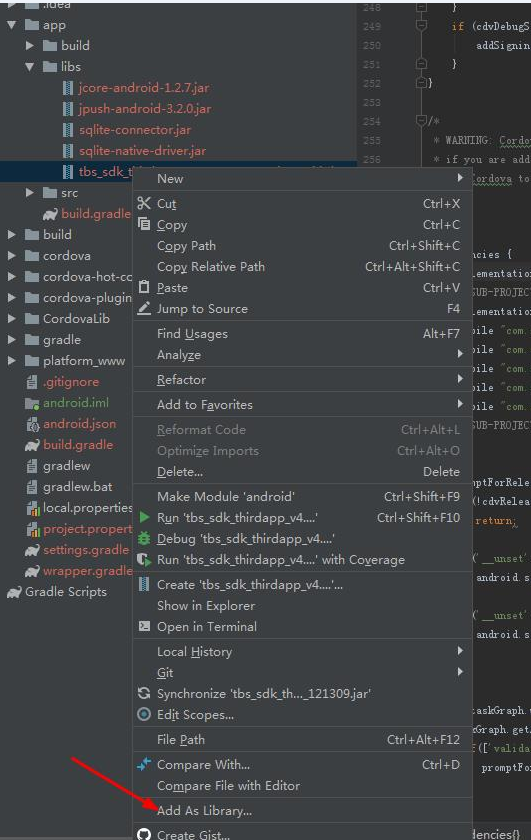
image.png
D:\Apps\ESchoolApp_Debug\platforms\android\app\src\main\java\com\wanm\exxteacher\X5FileOpen.java
package com.wanm.exxteacher; import android.content.Context; import android.util.Log; import com.tencent.smtt.sdk.QbSdk; import org.apache.cordova.CallbackContext; import org.apache.cordova.CordovaPlugin; import org.json.JSONArray; import org.json.JSONException; public class X5FileOpen extends CordovaPlugin { public void openFile(String filepath, String filename, CallbackContext callbackContext) { Context context = this.cordova.getActivity(); String filePath = filepath.substring(7); String fileName = filename; // Log.d("wjb-open", "路径:" + filePath+","+QbSdk.isTbsCoreInited()+","+MainActivity.isX5Loaded); if (!QbSdk.isTbsCoreInited()) { callbackContext.error("插件正在初始化,请等待..."); return; } if (!MainActivity.isX5Loaded) { callbackContext.error("插件正在初始化,请等待..."); return; } DisplayFileActivity.openDispalyFileActivity(context, filePath, fileName); } @Override public boolean execute(String action, JSONArray args, CallbackContext callbackContext) throws JSONException { if ("openFile".equals(action)) { String filepath = args.getString(0); String filename = args.getString(1); openFile(filepath, filename, callbackContext); return true; } return false; } }D:\Apps\ESchoolApp_Debug\platforms\android\app\src\main\java\com\wanm\exxteacher\MainActivity.java
package com.wanm.exxteacher; import android.content.SharedPreferences; import android.os.Bundle; import org.apache.cordova.*; import com.tencent.smtt.sdk.QbSdk; import com.tencent.smtt.sdk.TbsListener; import android.util.Log; import java.util.Timer; import java.util.TimerTask; //import java.util.Timer; //import java.util.TimerTask; public class MainActivity extends CordovaActivity { static boolean isX5Loaded = true; @Override public void onCreate(Bundle savedInstanceState) { super.onCreate(savedInstanceState); // enable Cordova apps to be started in the background Bundle extras = getIntent().getExtras(); if (extras != null && extras.getBoolean("cdvStartInBackground", false)) { moveTaskToBack(true); } // Set by <content src="index.html" /> in config.xml loadUrl(launchUrl); // 覆盖安装后首次打开,重置x5内核 SharedPreferences preferences = getSharedPreferences("first_open", MODE_PRIVATE); boolean isFirstIn = preferences.getBoolean("is_first_open", true); if (isFirstIn) { //第一次进入时先把first_open置为false以便后来进入时进行判断,除此之外,还可以写入第一次进入时苏要执行的动作 preferences = getSharedPreferences("first_open", MODE_PRIVATE); SharedPreferences.Editor editor = preferences.edit(); editor.putBoolean("is_first_open", false); editor.commit(); // Log.d("wjb", "第一次进入,reset重置完成"); QbSdk.reset(this); } else { //不是第一次进入时所要做的动作 // Log.d("wjb", "不是第一次进入"); } //X5内核初始化,延时10秒,防止和热更新冲突 Timer t = new Timer(); t.schedule(new TimerTask() { public void run() { initX5(); preinitX5WebCore(); this.cancel(); } }, 10000); // initX5Timer();//检测是否初始化完成 QbSdk.setTbsListener(new TbsListener() { @Override public void onDownloadFinish(int i) { // Log.d("wjb-listen", "onDownloadFinish"); isX5Loaded = false; } @Override public void onInstallFinish(int i) { // Log.d("wjb-listen", "onInstallFinish"); isX5Loaded = true; } @Override public void onDownloadProgress(int i) { // Log.d("wjb-listen", "onDownloadProgress:" + i); isX5Loaded = false; } }); } // private void initX5Timer() { // //创建定时器对象 // Timer t = new Timer(); // if (!QbSdk.isTbsCoreInited()) { // Log.d("wjb-timer", "失败:" + num); // //在3秒后执行MyTask类中的run方法 // t.schedule(new TimerTask() { // public void run() { initX5(); // initX5Timer(); // this.cancel(); // } // }, 2000); // } else { // Log.d("wjb-timer", "成功:" + num); // } // } private void preinitX5WebCore() { if (!QbSdk.isTbsCoreInited()) { // Log.d("wjb", "x5内核初始化失败"); // preinit只需要调用一次,如果已经完成了初始化,那么就直接构造view QbSdk.preInit(MainActivity.this, null);// 设置X5初始化完成的回调接口 } } // private Integer num = 1; /** * 初始化x5内核并加载 */ private void initX5() { // Log.d("wjb", "x5内核进入初始化程序" + num); //QbSdk.isTbsCoreInited()用来判断x5内核是否已经加载了 if (QbSdk.isTbsCoreInited()) { //如果已经加载 // Log.d("wjb", "QbSdk.isTbsCoreInited: true 已经加载x5内核"); } else { //还没加载,就要初始化内核并加载 // Log.d("wjb", "QbSdk.isTbsCoreInited: false 还没加载x5内核"); QbSdk.setDownloadWithoutWifi(true);//非wifi条件下允许下载X5内核 //初始化x5内核 QbSdk.initX5Environment(this, new QbSdk.PreInitCallback() { @Override public void onCoreInitFinished() { } @Override public void onViewInitFinished(boolean b) { if (b == true) { // Log.d("wjb", "x5内核初始化成功"); } else { // Log.d("wjb", "x5内核初始化失败"); // num++; initX5(); } } }); } } }D:\Apps\ESchoolApp_Debug\platforms\android\app\build.gradle
android { defaultConfig { ... //引用tbsplus ndk { //选择要添加的对应cpu类型的.so库 不能添加arm64-v8a 不然x5内核加载不上去 abiFilters "armeabi", "armeabi-v7a", "x86", "mips" } } } dependencies { implementation fileTree(include: '*.jar', dir: 'libs') // SUB-PROJECT DEPENDENCIES START implementation project(path: ':CordovaLib') compile 'com.squareup.okhttp3:okhttp-urlconnection:3.10.0' compile 'com.android.support:support-v4:24.1.1+' compile 'com.soundcloud.android:android-crop:1.0.0@aar' compile 'com.android.support:support-v4:27.+' compile 'com.android.support:appcompat-v7:27+' //-------------这个版本必须对 //运行时权限 compile 'com.tbruyelle.rxpermissions2:rxpermissions:0.9.4@aar' compile 'io.reactivex.rxjava2:rxjava:2.0.2' compile 'com.jakewharton.rxbinding2:rxbinding:2.0.0' implementation files('libs/tbs_sdk_thirdapp_v4.3.0.1020_43633_sharewithdownload_withoutGame_obfs_20190111_105200.jar') }D:\Apps\ESchoolApp_Debug\platforms\android\app\src\main\res\xml\config.xml
<feature name="X5FileOpen"> <param name="android-package" value="com.wanm.exxteacher.X5FileOpen" /> </feature>D:\Apps\ESchoolApp_Debug\platforms\android\app\src\main\AndroidManifest.xml
<!-- TBS预览文件界面 --> <activity android:name=".DisplayFileActivity" android:theme="@style/Theme.AppCompat"></activity>D:\Apps\ESchoolApp_Debug\platforms\android\app\src\main\java\com\wanm\exxteacher\DisplayFileActivity.java
package com.wanm.exxteacher; import android.Manifest; import android.content.Context; import android.content.Intent; import android.os.Bundle; import android.os.Environment; import android.support.v7.app.AppCompatActivity; import android.util.Log; import android.view.ViewGroup; import android.widget.RelativeLayout; import android.widget.Toast; import com.tbruyelle.rxpermissions2.RxPermissions; import com.tencent.smtt.sdk.TbsReaderView; import io.reactivex.functions.Action; import io.reactivex.functions.Consumer; /** * Created by HaiyuKing * Used 调用腾讯浏览服务预览文件 */ public class DisplayFileActivity extends AppCompatActivity{ private static final String TAG = DisplayFileActivity.class.getSimpleName(); private TbsReaderView mTbsReaderView;//用于预览文件5-1 private String filePath = ""; private String fileName = ""; public static void openDispalyFileActivity(Context context,String filePath,String fileName){ Intent intent = new Intent(context,DisplayFileActivity.class); intent.putExtra("filepath",filePath); intent.putExtra("filename",fileName); context.startActivity(intent); } @Override protected void onCreate(Bundle savedInstanceState) { super.onCreate(savedInstanceState); setContentView(R.layout.activity_displayfile); initTbsReaderView();//用于预览文件5-2 Intent intent = getIntent(); filePath = intent.getStringExtra("filepath"); fileName = intent.getStringExtra("filename"); onePermission(); } @Override protected void onDestroy() { super.onDestroy(); mTbsReaderView.onStop();//用于预览文件5-5 } //初始化TbsReaderView 5-3 private void initTbsReaderView(){ mTbsReaderView = new TbsReaderView(DisplayFileActivity.this, new TbsReaderView.ReaderCallback(){ @Override public void onCallBackAction(Integer integer, Object o, Object o1) { //ReaderCallback 接口提供的方法可以不予处理(目前不知道有什么用途,但是一定要实现这个接口类) } }); RelativeLayout rootRl = (RelativeLayout) findViewById(R.id.root_layout); rootRl.addView(mTbsReaderView, new RelativeLayout.LayoutParams(ViewGroup.LayoutParams.MATCH_PARENT, ViewGroup.LayoutParams.MATCH_PARENT)); } //预览文件5-4 /** * filePath :文件路径。格式为 android 本地存储路径格式,例如:/sdcard/Download/xxx.doc. 不支持 file:///格式。暂不支持在线文件。 * fileName : 文件的文件名(含后缀)*/ private void displayFile(String filePath,String fileName) { Bundle bundle = new Bundle(); bundle.putString("filePath", filePath); bundle.putString("tempPath", Environment.getExternalStorageDirectory().getPath()); boolean result = mTbsReaderView.preOpen(parseFormat(fileName), false); if (result) { mTbsReaderView.openFile(bundle); } } private String parseFormat(String fileName) { return fileName.substring(fileName.lastIndexOf(".") + 1); } /**只有一个运行时权限申请的情况*/ private void onePermission(){ RxPermissions rxPermissions = new RxPermissions(DisplayFileActivity.this); // where this is an Activity instance rxPermissions.request(Manifest.permission.READ_EXTERNAL_STORAGE) //权限名称,多个权限之间逗号分隔开 .subscribe(new Consumer<Boolean>() { @Override public void accept(Boolean granted) throws Exception { Log.e(TAG, "{accept}granted=" + granted);//执行顺序——1【多个权限的情况,只有所有的权限均允许的情况下granted==true】 if (granted) { // 在android 6.0之前会默认返回true // 已经获取权限 //Toast.makeText(DisplayFileActivity.this, "已经获取权限", Toast.LENGTH_SHORT).show(); } else { // 未获取权限 Toast.makeText(DisplayFileActivity.this, "您没有授权该权限,请在设置中打开授权", Toast.LENGTH_SHORT).show(); } } }, new Consumer<Throwable>() { @Override public void accept(Throwable throwable) throws Exception { Log.e(TAG,"{accept}");//可能是授权异常的情况下的处理 } }, new Action() { @Override public void run() throws Exception { Log.e(TAG,"{run}");//执行顺序——2 displayFile(filePath,fileName); } }); } }D:\Apps\ESchoolApp_Debug\platforms\android\app\src\main\res\layout\activity_displayfile.xml
右键New > XML/Layout XML File
<?xml version="1.0" encoding="utf-8"?> <RelativeLayout xmlns:android="http://schemas.android.com/apk/res/android" android:id="@+id/root_layout" android:layout_width="match_parent" android:layout_height="match_parent" android:theme="@style/Theme.AppCompat"> </RelativeLayout>D:\Apps\ESchoolApp_Debug\platforms\android\gradle.properties
Android.useDeprecatedNdk=true;cordova.exec( success => { alert("success = " + success) }, fail => { alert("fail = " + fail) }, "X5FileOpen", "openFile", [filePath, filename]);/** *打开文件 * * @param {*} filePath //文件路径 * @returns {Promise<any>} * @memberof FileProvider */ openFile(filePath): Promise<any> { let fileSuffix = PubFunction.GetFileSuffix(filePath); let mime = PubFunction.getFileMimeType(fileSuffix); return new Promise((r, j) => { if (this.plat.is("android")) { if(["jpg", "gif", "png"].indexOf(fileSuffix)>=0){ this.fileOpener.open(filePath, mime) .then((entry) => { r(entry); }) }else{ let filename = PubFunction.getFileName(filePath); cordova.exec( success => { // alert("success = " + success); r(); }, fail => { // alert("fail = " + fail); this.popupUtil.Alert("提示", fail); }, "X5FileOpen", "openFile", [filePath, filename]); } } else if (this.plat.is("ios")) { this.fileOpener.open(filePath, mime) .then((entry) => { r(entry); }) .catch((err: any) => { this.popupUtil.Alert("提示", "打开文件失败,请安装支持此文件的应用"); }); } }) }原文链接:https://blog.csdn.net/bobo789456123/article/details/117252404?ops_request_misc=%257B%2522request%255Fid%2522%253A%252240830afdf8a7af0284ff9ff5fd659879%2522%252C%2522scm%2522%253A%252220140713.130102334.pc%255Fblog.%2522%257D&request_id=40830afdf8a7af0284ff9ff5fd659879&biz_id=0&utm_medium=distribute.pc_search_result.none-task-blog-2~blog~first_rank_ecpm_v1~times_rank-5-117252404-null-null.nonecase&utm_term=%E9%A3%9E%E7%89%9BOS